
Powered by Advanced AI

Break language barriers in every meeting with AI-powered real-time translation.

The platform where everyone speaks their own language and hears others in theirs. No interpreters, no waiting, no misunderstandings — just natural conversation across 40+ languages, all within a single virtual room.

BYOK

BYOK available: use your own AI keys for better cost control, provider flexibility, and billing ownership.

See how BYOK works
Watch Demo

🔐 Closed beta: invitation-only access (limited spots)

Early access (Closed beta)

Join the waitlist and we'll email you when a spot becomes available.

No spam. We'll only email you when there's availability.

E2E
Encryption
+40
Languages
Scalable
Low
Latency

Designed for international teams across industries

GDPR Compliant SOC 2 Ready Enterprise-Grade E2E Encryption Proprietary AI Translation Agent

Integrations with leading providers

All trademarks are the property of their respective owners. Use of these names does not imply affiliation, sponsorship, or endorsement.

Supported by leading AI and cloud programs

ElevenLabs Grants
NVIDIA Inception Program goMeetalk is a member of NVIDIA Inception.

See goMeetalk in action

Discover how real-time translation transforms your international meetings

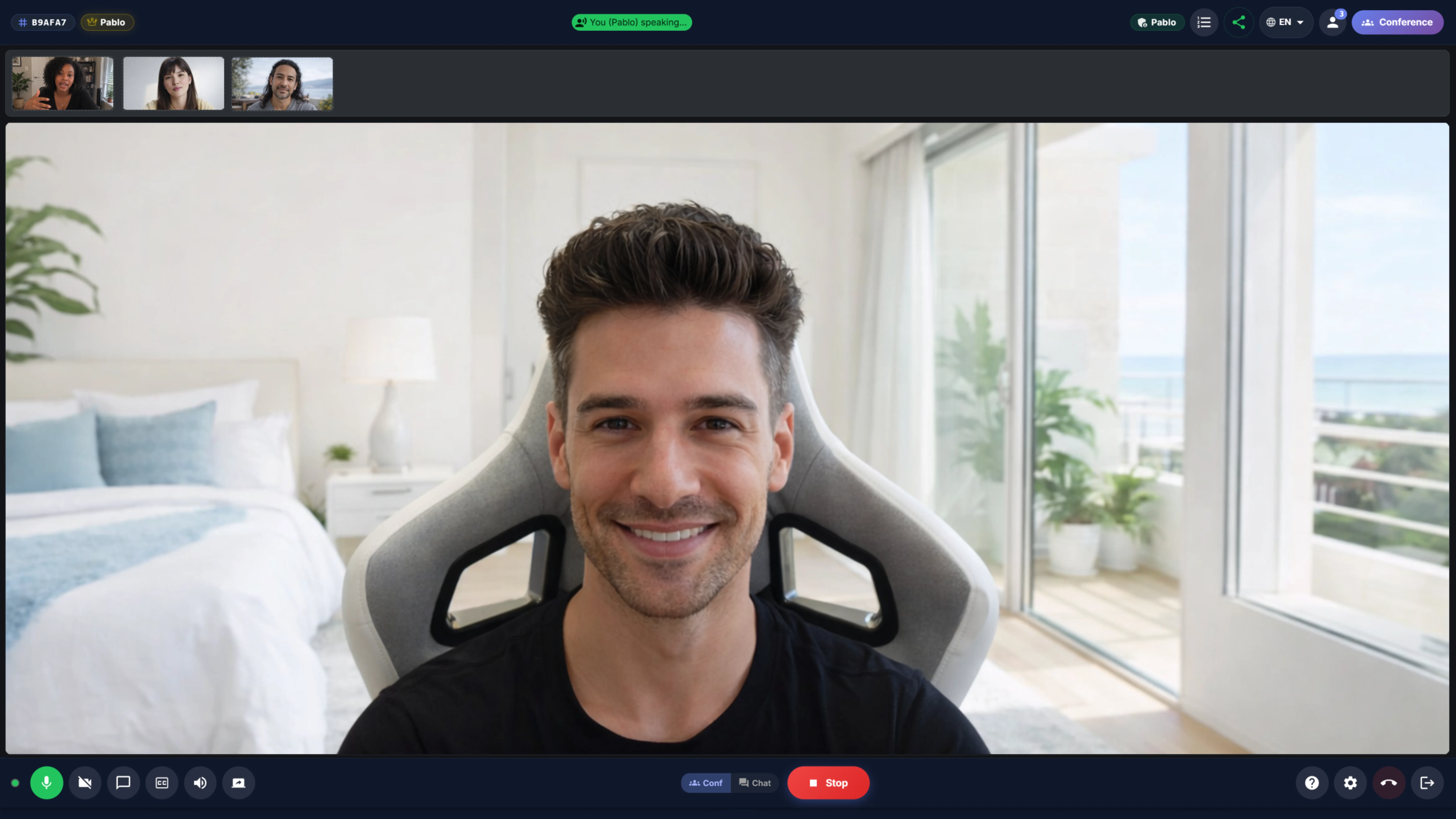
goMeetalk conference room view with live real-time translation

BYOK

Meeting translation with your own AI stack

Connect your own provider keys to reduce markup exposure, keep billing visibility, and choose the right provider for each workflow.

Lower pricing friction

Avoid bundling everything into a single closed pricing layer when your team already pays for AI providers directly.

Provider-level flexibility

Choose the provider setup that fits your latency, voice quality, language coverage, or budget requirements.

Enterprise billing visibility

Keep usage visibility closer to your own provider account instead of abstracting the whole stack behind one vendor layer.

How BYOK works

  1. Add your API key securely
  2. Pick the supported provider for your workflow
  3. Track usage and billing from your own account

Everything you need for global meetings

Cutting-edge technology to connect teams regardless of language

Real-time translation

Hear every participant in your language with low latency

40+ languages supported

Spanish, English, Chinese, Arabic, Japanese, German, French and many more

HD Video with LiveKit

High-quality video conferencing with next-generation WebRTC technology

Ultra-low latency

Low delay for natural, fluid conversations

Enterprise security

E2E encryption, GDPR compliance, and data handling with minimal, controlled storage when necessary

Multi-engine AI

Azure, Google Cloud and ElevenLabs combined for maximum voice quality

Pro

Post-meeting summary

Create meeting summaries in one click with ChatGPT, using prebuilt prompts

Real-time subtitles

Automatic subtitles in your language with customizable size, position and background options

Local recording

Record screen and audio directly to your device with no limits or extra costs

Meeting modes

Conference Mode with speaking queue or Chat Mode for free simultaneous conversation

Raise your hand

Ordered queue system for large meetings: request your turn and speak when called

Moderation controls

Mute/unmute participants to keep meetings organized.

How does it work?

Three simple steps to start communicating without barriers

1

Create or join a room

Generate a room in seconds or join with a code shared by another participant

2

Select your language

Choose the language you speak and the language you want to hear others in

3

Speak naturally

AI automatically translates your voice so everyone understands you in their language

CATL

Contextual subtitle layer

Subtitles that understand context

The main translation runs uninterrupted. In parallel, CATL detects domain-specific terms —legal, medical, tech, finance— and adds a contextual note as a second subtitle line.

  • Acronyms explained
  • Ambiguity resolved
  • Parallel, non-blocking
More about how CATL works

CATL v1 uses curated deterministic detection over the speaker's transcribed text. When it finds one or more relevant catalog terms with sufficient confidence, it emits a separate event that the frontend renders as a second subtitle line. The STT → Translation → TTS pipeline receives no modification.

Solutions for every sector

goMeetalk adapts to your industry's needs

Global companies

International meetings without interpreters. Connect teams from around the world in real-time.

Education

Classes with students from any country. Break language barriers in online teaching.

Telemedicine

Multilingual remote care. Communicate with patients in their language when needed.

Events and conferences

International webinars and conferences with simultaneous translation for all attendees.

Remote teams

Barrier-free collaboration for teams distributed across different countries and time zones.

International sales

Close deals with clients from any country. Present in your language, they hear in theirs.

Customer Support

Global support without language barriers: onboarding, troubleshooting, and real-time assistance.

HR

Multilingual interviews and onboarding for hiring and coordinating global talent.

Plans for every need

Choose the plan that best fits your team

Annual plan is billed as a single payment.

Prices exclude taxes. Taxes (VAT, etc.) are calculated at checkout based on your country.

Free
€0 /forever

15 native min/month to try

Standard browser voice

  • Up to 3 participants
  • All languages (40+)
  • 1 simultaneous room
  • Native mode (browser voice)
  • No extra minutes

*Includes Azure/Google translation

Starter
€19 /month
Standard + premium voices Standard + premium

Switch between Native (browser) and Premium

75 native + 75 premium min/month

Extra minutes (as used): Native +€0.06/min • Premium +€0.15/min

  • Up to 5 participants
  • Up to 5 simultaneous languages/room
  • 1 premium simultaneous room
  • Azure/Google Premium voices
  • Email support

World-class technology

Built on the best AI platforms in the market

Multi-provider AI

Azure, Google Cloud, ElevenLabs and Deepgram (BYOK on Business/Enterprise) for transcription and voice

Low latency

Optimized for natural conversations without interruptions

Security & Compliance

E2E encryption and team controls (SSO/SAML, policies, audit) plan-dependent

Scalable architecture

WebRTC with LiveKit + infrastructure ready for teams and organizations

Security and regulatory compliance

Your privacy and your clients', backed by real certifications and agreements

Certified infrastructure

We operate on SOC 2 Type II and ISO 27001 certified servers.

HIPAA privacy

Designed to meet health data security standards (PHI) through Business Associate Agreements (BAA).

GDPR compliance

Voice and AI processing located in the European Union, with international transfers protected by Standard Contractual Clauses (SCCs) and Data Processing Agreements (DPA).

Frequently asked questions

We answer your questions about goMeetalk

No questions found matching your search.
goMeetalk uses advanced artificial intelligence to transcribe your voice, translate it to the recipient's language, and play it back with natural voices. This entire process happens with low latency, enabling fluid and natural conversations.
We support over 40 languages including: Spanish, English, French, German, Italian, Portuguese, Chinese (Mandarin), Japanese, Korean, Arabic, Russian, Hindi, and many more. We constantly add new languages based on demand.
Absolutely. goMeetalk uses end-to-end encryption (E2E) for all communications. We comply with GDPR and do not store conversations permanently unless the user explicitly requests it in premium plans.
Yes, each participant can speak in their native language and select which language they want to hear others in. This allows meetings with participants from multiple countries to work seamlessly.
goMeetalk specializes in real-time translation, something Zoom and Teams don't offer natively. You can use goMeetalk independently or complement it with these platforms by sharing translated audio in your existing meetings.
No, goMeetalk works directly in your web browser (Chrome, Firefox, Safari, Edge). You don't need to download or install any application. You just need an internet connection and a microphone.
The maximum number of participants depends on the room creator's plan: Free up to 3, Starter up to 5, Pro up to 10, Business up to 25, and Enterprise up to 100. Anyone can join a room if there's space available, regardless of their own plan.
In goMeetalk you have two types of minutes depending on the mode you use: Native Minutes (browser engine - WebSpeech) and Premium Minutes (Premium engines like Azure or Google). They're independent: if one runs out, the other can keep working if it still has minutes available. In your account you'll always see how many minutes you have of each type.
It depends on your settings: if pay-per-use is disabled, when the mode you're using reaches its limit, that mode pauses (you can switch to the other mode if it still has minutes). If pay-per-use is enabled, you can continue using the service and only the excess of the active mode (Native or Premium) is charged, according to your plan's rates.
You can set a maximum spending limit in your profile settings. When you reach that limit, extra consumption stops automatically until the next month. Overage rates depend on the plan and minute type (Native or Premium), and you'll always see exact prices in your account according to your currency (EUR/USD/GBP).
Yes, anyone can join any room if there's space. The room capacity (maximum number of participants) is determined by the creator's plan. Your minute consumption is counted in your own account, not the creator's.
Business plans include "unlimited" rooms under fair use policy. This means we include up to 3 active rooms simultaneously per organization, with the possibility to expand on demand by contacting our team. For Enterprise, concurrency is fully configurable per contract (10, 25, 50 or 100+ rooms).
Yes. You can switch between light and dark themes from your profile settings.
Yes. You can switch between the original audio and the translation whenever you need.
Payments are securely processed through Stripe. For Business, billing is B2B and includes tax details (VAT).

BYOK — Bring Your Own Key

An API Key is like a password that gives you access to an external service. On the Pro plan, you can connect your own ElevenLabs key to enjoy their ultra-realistic voices at no extra cost on goMeetalk — you only pay ElevenLabs directly based on your usage. This gives you unlimited premium voice minutes. Setting it up is super easy: just paste your key in your profile settings. See step-by-step guide →
With BYOK enabled, usage is tied to the customer's configured provider account, not to goMeetalk.
Yes. The BYOK experience is designed to support provider flexibility instead of locking you into one cost structure.
For some teams, BYOK is useful when they want tighter cost visibility, provider choice, or internal procurement alignment.

CATL — Contextual subtitles

CATL (Contextual Augmented Translation Layer) is a contextual subtitle layer that analyzes transcribed text in real time and adds a note as a second subtitle line —acronym definitions, technical terms, or ambiguous expressions— without modifying or interrupting the main translation pipeline.
No. CATL runs in parallel and never touches the main audio pipeline (STT → Translation → TTS). If CATL fails or exceeds its internal timeout, it degrades silently: the note simply doesn't appear and the translation continues working normally.
It appears as a second line below the main subtitle, in italic style and smaller font. The note displays for a few seconds and disappears automatically (default TTL of approximately 60 seconds).
CATL v1 covers four domains: legal (NDA, GDPR, SLA, force majeure...), medical (HIPAA, DNR, ICU...), tech (API, OAuth, CI/CD...) and finance (EBITDA, ROI, AML...). Especially useful in meetings where acronyms or specialized terms can create confusion between participants speaking different languages.
No. CATL runs as a parallel process and does not block or delay the main pipeline. It has an internal safety timeout: if it doesn't complete analysis within the time limit, the insight is silently discarded. The main translation is never affected.
In v1, notes appear in the term's reference language, which is currently English for all terms in the catalog. Multi-language note support is planned for future CATL versions.
Early access · Limited spots

Save your spot in the closed beta.

We're opening spots in waves. Sign up to be among the first to speak your language and hear theirs.

Personal onboarding Lifetime early-bird price Discord channel access